Never miss Avios or Virgin Points
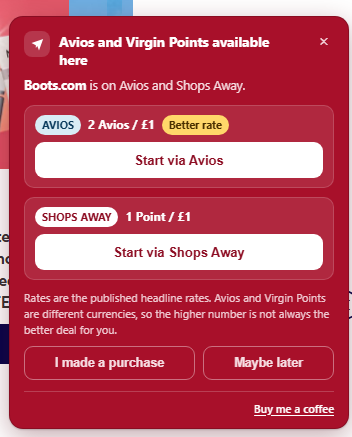
A quiet Chrome reminder when the site you're shopping on can earn Avios or Virgin Points. See the available programmes and headline rates before you buy — and nothing appears on sites that don't qualify.
How it works
Three steps, and then you forget it exists until it's useful.
Install from the Chrome Web Store
Add the extension to Chrome, choose where you want the reminder to appear, and you're done.
Shop as normal
When a site can earn Avios, Virgin Points, or both, a small card appears in your chosen corner with the available options.
Choose where to earn
Compare the headline rates, then use the button for the rewards route you want before making your purchase.
Browse Shops Away retailers
Search the Virgin Atlantic Shops Away retailer list below. The extension also checks supported Avios earning sites automatically while you browse.
Loading the retailer list…
What it doesn't do
The extension needs one thing to work: the address of the page you're on, checked against a list stored on your own machine.
- No browsing history — nothing is recorded, nothing is uploaded.
- No rewards logins — it never asks for your Avios or Virgin Atlantic account details.
- No payment details — it can't see them and doesn't want them.
- No tracking — no analytics, no telemetry, no third-party scripts.
- No affiliate meddling — it never rewrites or intercepts a tracking link.
- Minimal network use — it only fetches the retailer data it needs to show reminders.